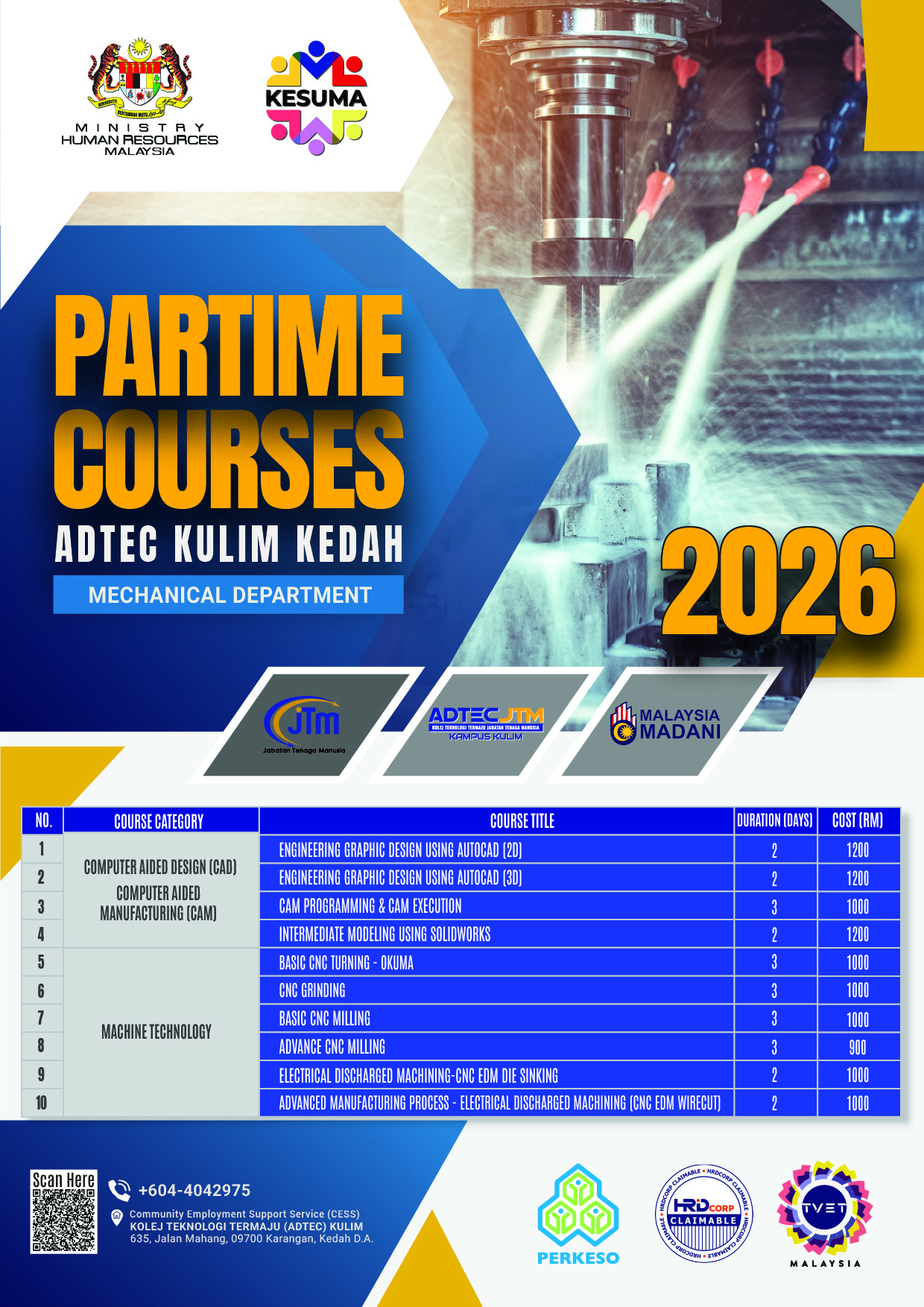
| Course Title | Duration (Day) | Cost (RM) |
|---|---|---|
|
1. BASIC CNC TURNING - OKUMA
CNC turning course introducing machine setup, tooling, G-code programming, safety practices and hands-on machining using OKUMA CNC lathe. |
3 | 1000 |
|
2. BASIC CNC MILLING
Introduction to CNC milling operations covering machine components, tooling, coordinate systems and basic G-code programming with practical sessions. |
3 | 1000 |
|
3. ADVANCE CNC MILLING
Advanced CNC milling focusing on complex machining, multi-axis operations, toolpath optimization and precision manufacturing techniques. |
3 | 900 |
|
4. CAM PROGRAMMING & CAM EXECUTION
Training in CAM software for toolpath generation, simulation and execution on CNC machines using industry-standard practices. |
3 | 1000 |
|
5. CNC GRINDING
Fundamentals of CNC grinding including machine setup, wheel selection and precision grinding operations. |
3 | 1000 |
|
6. ENGINEERING GRAPHIC DESIGN USING AUTOCAD (2D)
2D engineering drawing using AutoCAD covering drafting standards, dimensioning, layout, layers and plotting. |
2 | 1200 |
|
7. ENGINEERING GRAPHIC DESIGN USING AUTOCAD (3D)
3D modeling using AutoCAD including solid modeling, visualization and technical documentation. |
2 | 1200 |
|
8. INTERMEDIATE MODELING USING SOLIDWORKS
Intermediate SolidWorks modeling covering advanced features, assemblies, configurations and technical drawings. |
2 | 1200 |
|
9. CNC EDM DIE SINKING
Introduction to CNC EDM Die Sinking including spark erosion principles, electrode design and precision cavity machining. |
2 | 1000 |
|
10. CNC EDM WIRE CUT
Wire cut EDM machining covering programming, setup, parameter control and precision cutting techniques. |
2 | 1000 |
|
11. IM15: ENGINEERING DESIGN SOFTWARE – SOLIDWORKS (LEVEL 1)
Basic SolidWorks training including sketching, part modeling, extrude and cut features. |
2 | 850 |
|
12. IM18: ENGINEERING DESIGN SOFTWARE – INVENTOR (LEVEL 1)
Introduction to Autodesk Inventor covering sketching, part modeling, assemblies and drawings. |
2 | 850 |
|
13. IM22: ENGINEERING DESIGN SOFTWARE – AUTOCAD (LEVEL 1)
AutoCAD fundamentals including interface navigation, drawing tools, layers, dimensioning and plotting. |
2 | 850 |
|
14. IM30: ENGINEERING CAM SOFTWARE – MASTERCAM MILL (LEVEL 1)
Mastercam milling covering toolpath creation, multi-axis machining and CAM simulation. |
2 | 1800 |
|
15. IM30: ENGINEERING CAM SOFTWARE – MASTERCAM MILL (LEVEL 2)
|
2 | 2200 |
|
16. PREPARATION & INITIAL TRIAL RUN
|
2 | 1800 |
|
17. INTRODUCTION TO MASTERCAM POST PROCESSOR
|
2 | 2000 |